
Knowledge Base
Retrieval-augmented knowledge bases that ground AI blocks in your own content.
Knowledge bases store and index your content so workflows and agents can retrieve relevant context at run time (RAG). Documents are chunked, embedded, and searched with a hybrid of semantic and keyword matching.
Creating a knowledge base
Create a knowledge base from the Knowledge Base view or POST /api/v1/knowledge-bases. Each
base has a name, description, and chunking configuration:
| Setting | Default | Meaning |
|---|---|---|
minChunkSizeChars | 100 | Minimum characters per chunk |
maxChunkSizeTokens | 1024 | Maximum tokens per chunk |
overlapTokens | 200 | Token overlap between adjacent chunks |
Add content by attaching Documents to the base — a document can belong to one or more knowledge bases. Supported uploads include PDF, DOCX, PPTX, HTML, TXT, Markdown, JSON, and CSV; text is extracted automatically.
To pull a bounded batch from a certified external source (Google Drive, Confluence, Slack, or
GitHub), create a knowledge connector on the base and run a
manual sync. Applied upserts become workspace documents linked to that base with
indexingStatus reset to pending.
How indexing works
When a document is attached, Confluye extracts its text, creates searchable chunks, and computes the semantic index in the background. The embedding provider and model are managed by Confluye: workspace members do not configure or supply embedding credentials. This is separate from BYOK, which remains available for chat and workflow AI.
Each document shows an indexing status — Ready, Processing, Keyword-only, Not indexed, or Failed — and you can re-index a single document or the whole workspace.
Searching and retrieval
Search combines a keyword score (name and chunk hits, coverage, phrase boosts) with vector cosine
similarity. When vector scores are present it returns a weighted hybrid ranking; otherwise it falls
back to pure keyword ranking. Each result reports its provenance — vector, hybrid, or
keyword. Query directly with POST /api/v1/knowledge-bases/search, optionally across all bases.
Optional platform-funded query rewriting and reranking require an eligible organization billing
account. Without one, retrieval continues without those model enhancements; Confluye does not send
the generation request to OpenAI or enable spending automatically. An organization Owner should
check Settings → Subscription to enable platform-funded AI. Operators can correlate the
Service-managed Knowledge AI unavailable; using retrieval fallback log with its workspace,
reason and request correlation. account_missing means the workspace or its billing account
was not found; it is not an invalid OpenAI key. Unexpected provider or database failures remain
reported separately.
Using in workflows
Knowledge is both readable and maintainable from normal workflows through two separate nodes:
- Knowledge (
knowledgeSearch) — retrieves the chunks matching a query, with configuration for the target base and document status. Retrieval carries chunk and hybrid/vector provenance, honors Knowledge Base and document ACLs and filters, and excludes trashed documents. When semantic indexing is unavailable it degrades to keyword-only results rather than failing. - Knowledge Doc (
knowledgeDocument) — performs the document lifecycle through the canonical document capabilities:create,update,trash,restore,link,unlink,reindex, andstatus. Mutations require workspace/Knowledge Base ownership, an optional expected document version or indexing generation, confirmation, and idempotency, and return the document ID, links, indexing generation, and status. When an expected generation is supplied it is enforced as an atomic compare-and-set at the mutation boundary (a monotonic generation bump), so two concurrent edits carrying the same expectation cannot both apply — exactly one wins and the loser is rejected with a generation conflict, never a silent overwrite. A scoped not-found is reported without revealing cross-workspace existence. - Retrieval QA — produces a RAG-augmented answer that cites retrieved context.
A create or update can optionally set wait-until-searchable: the run parks (releasing its
worker) on a generation-specific correlation and resumes when that generation reaches indexed,
keyword_only, or failed, returning the terminal state as the node's output. A stale generation's
completion cannot wake a newer mutation, so an edit-then-query always sees the new fact and not the
old one. trash is a reversible move-to-trash that immediately excludes the document from retrieval;
restore (with a re-index) can make it searchable again. Permanent purge is an administrator-only API
operation, not a workflow node.
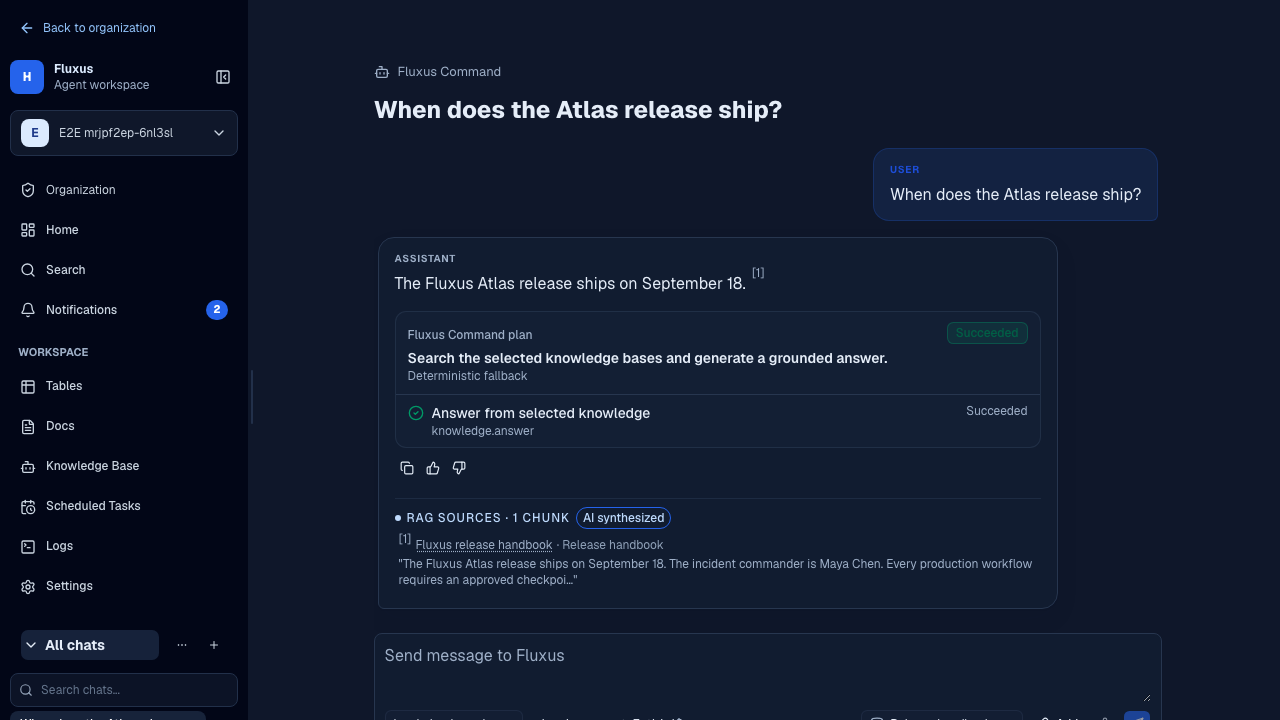
The Command Center also answers questions from attached knowledge bases automatically. For indexing lag, failure, or stale-generation recovery, see the Knowledge sync recovery runbook.
You can ask “According to the Knowledge Base, what is the response deadline?” or “Usa solamente el Knowledge Base. ¿Cuál es el plazo de respuesta?”. Ask for citations to inspect the source document, and ask the assistant to identify missing information instead of guessing. An answer about first response does not establish a final resolution deadline unless the sources say so.